Missed an offer and paid full price anyway?
Price check after the scan
Bonstructer holds the prices you paid against current offers in your region and against what you usually pay.
See example → Bonstructer
Open app
Bonstructer
Open app
Scan receipts · find them again · ask
After the scan every line item sits in the notebook with price and category — nothing to type. Then you just ask: Did I miss an offer? What can I cook tonight from yesterday’s shopping? What’s missing for my supermarket run?
No download needed · Sign in with Google, email or passkey · See the demo, no sign-up
What you get
Four things that take care of themselves after the scan.
Missed an offer and paid full price anyway?
Bonstructer holds the prices you paid against current offers in your region and against what you usually pay.
See example →In the shop, forgotten what you need?
Chat builds the list from what you regularly buy — and pushes it into Bring! if you want.
See example →Fridge full, no idea what to make?
Chat suggests a dish made mostly from ingredients you bought — diet preferences and household size are taken into account.
See example →Hunting for a receipt for the tax office, your boss or your landlord?
Pick the recipient, add the line items and the original photo — sent from your sign-in address.
See example →How it works
Bonstructer reads the receipt, you ask the questions.
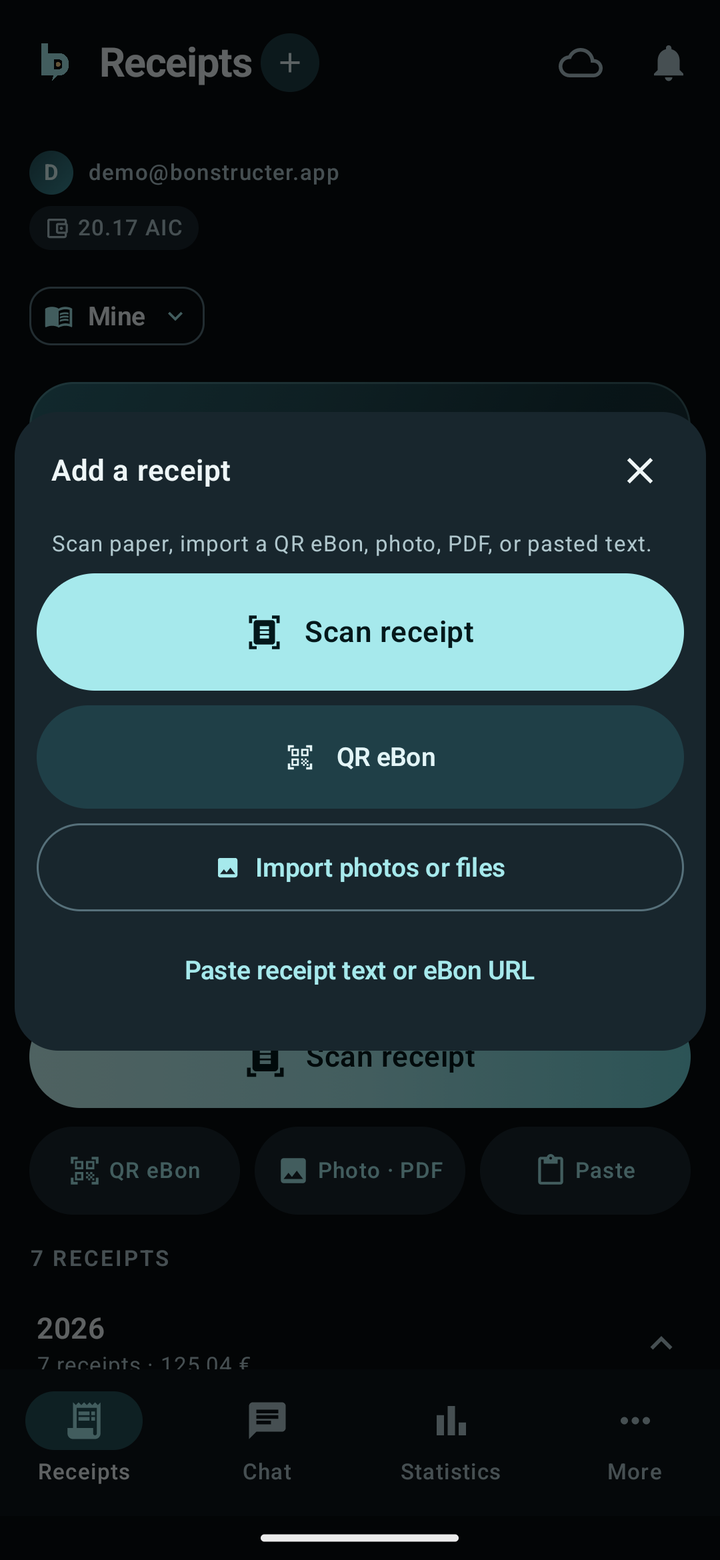
Point the camera — one tap. Or QR eBon, photo, PDF and text. Every line item with price and category is recognised. No receipt to hand? The demo notebook is already filled.
Ask in chat the way you’d ask a person: by shop, month, category, or a single item.
Answers as a table, chart or list. Or you ask for a price check, a shopping list, and a recipe idea from your shopping.
Scan quality
Real receipts from the founder’s own notebook, photographed with a phone years after the purchase. The photo on top, below it what Bonstructer read from it – without a single correction.
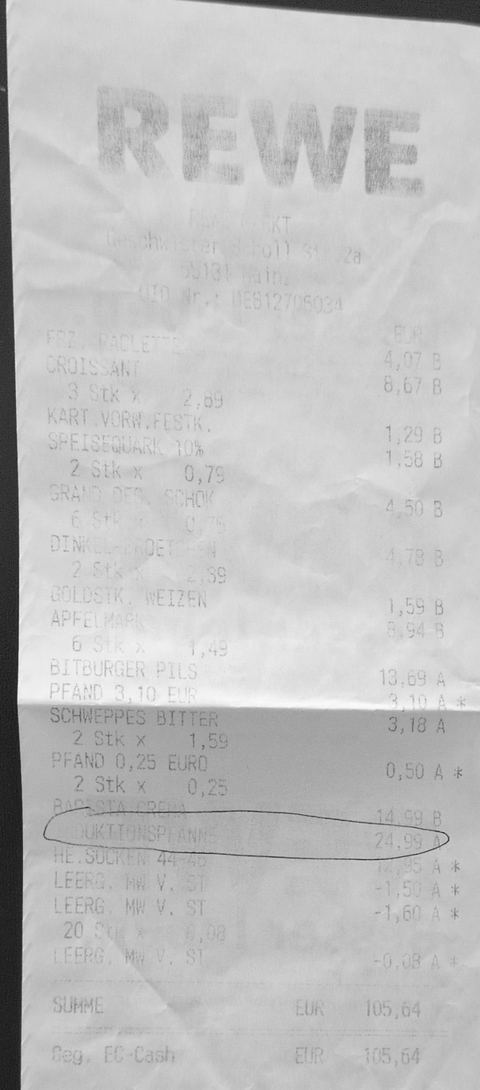 Almost white · crumpled
REWE29.12.2014
18 lines · total105,64 €
✓ Line sum = printed total
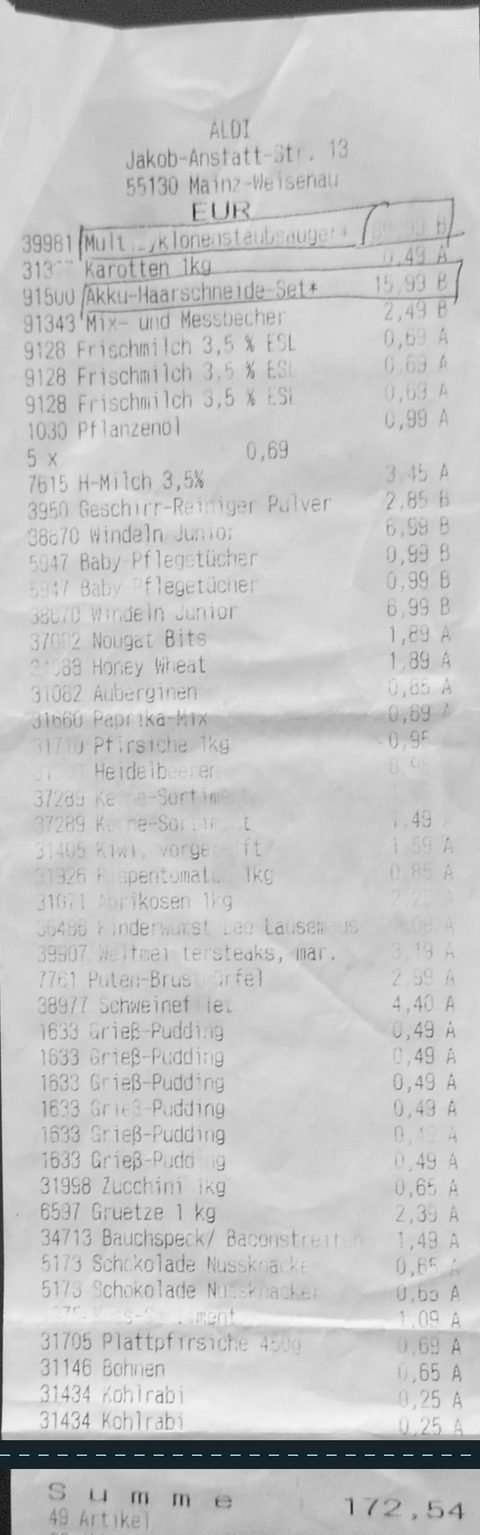 Long · dark · faded
ALDI08.08.2014
49 items in 45 lines · total172,54 €
✓ Line sum = printed total
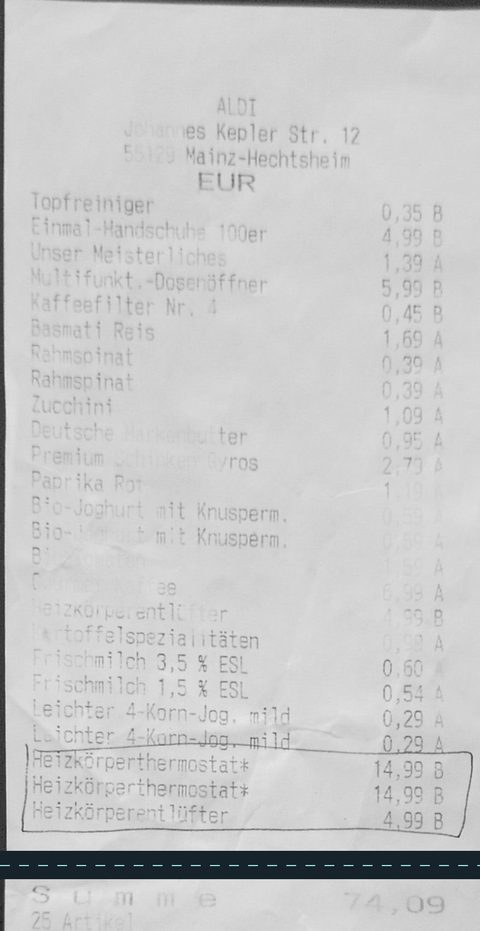 Crumpled · faint · scribbled on
ALDI29.01.2013
25 lines · total74,09 €
✓ Line sum = printed total
To be fair: what’s no longer visible on the paper, no app can read. Scan receipts right after shopping – thermal paper fades quickly. Payment details below the total are cropped from these examples.
Keeps getting better
A receipt didn’t work or a feature is missing? Tell us in the app – everyone benefits.
“Report problem” on the receipt – the team’s reply arrives in the app.
Recognition often learns unknown shops and layouts by the next day – for everyone.
Saved receipts can be read again; your corrections are kept.
Ideas go under More → Ideas and problems. What helps many can make it into a new version.
Use cases
Your receipts know more than you think. Ten questions that help every day — from price check to splitting the bill.
Price check New
After the scan Bonstructer compares every line with current offers in your region and with what you usually pay for that item.
Shopping list
From what you regularly buy there — without working out what’s missing yourself.
Cooking New
The suggestion is made mostly from what you just bought — diet preferences and household size are taken into account.
Share New
For taxes, your employer, your partner or your landlord: enter a recipient once, and it is remembered.
Price comparison
Real prices from your receipts — not from the flyer.
Price watch
The same items, compared over months.
Budget
Sweets, drinks, household — what actually eats the budget?
Warranty & proof
Returns, warranty, taxes — the receipt is there, not in a drawer.
Together
Share the notebook with your partner or flatmates — everyone scans, everyone sees the same.
Flatmates & couples New
The lines are already there. Tap who had what — Bonstructer works out who owes whom and sends each person their share via PayPal, Wero or GiroCode.
In 12 seconds
Keep receipts, plan the shop, just ask. Videos in German.
The app
From scan to answer with a chart — on the web, Android and iPhone.
Features
Paper receipt via camera, QR eBon, photo, PDF or pasted text — everything lands in the same notebook.
Not just the total: every line with quantity, price and category. Fixing a line takes one tap.
Receipt too long for one photo? Just take a few. The parts are stitched into one receipt automatically — lines repeated at the overlaps are dropped.
Categories, shops, month versus month — and pie or bar charts in chat on request.
One notebook for partner, family or flatmates. Invite by link, scan and ask together.
Ads stay off until you opt in. Receipts and chat are not used for ads. Hosted in Frankfurt. Delete any time.
Scan on your phone, look things up on your computer. On iPhone add it to the Home Screen — a native app is planned.
Every receipt against current offers in your postcode region and your own price history: missed offer, above usual price, potential savings.
For flatmates and couples: tap who had which line — everyone gets their share via PayPal, Wero or GiroCode. Your bank details stay end-to-end encrypted.
Weekly offers for your products, monthly spending, a budget alert and the daily recipe idea — they arrive on their own.
Add the shopping list to Bring! or copy it. Answers you want to keep land as an entry in the notebook.
Privacy
Ads are off by default. We do not sell your data, and receipts, chat and account data are not used for ads. App servers run in Frankfurt.
No banners, no autoplay, no tracking pixels. Optionally you can turn on videos in the Android app to earn AIC. Off by default. Receipts, chat and account data are not used for ads.
Receipts are processed only to perform the contract — not as a marketing opt-in. Delete individual receipts or your whole account whenever you want.
We never sell your data or share it with third parties for advertising or marketing. Processors only as needed to run the service — OCR, chat, hosting, payments.
App servers and receipt originals: Google Cloud in Frankfurt (europe-west3). Text recognition and chat via Google Cloud AI services (Vertex AI, Google does not retain the data) — processing may occur outside the EU; LlamaParse (EU endpoint) only as a fallback. Privacy policy
Guides
FAQ
A native App Store app is planned. Until then, open Bonstructer in Safari and choose Share → Add to Home Screen — it then sits on the iPhone like an app and uses the same sign-in as on the web and Android. On the iPhone just tap “For iPhone users” — the app walks you through it step by step.
Basic use is free, no subscription. Some extra and AI features as well as more storage use credits (AIC); the app shows the price up front.
Paper receipts via camera, QR eBons, photos, PDFs and pasted text. Photograph long receipts in several parts and the app stitches them together automatically. If a line is misread, you fix it right in the receipt.
Scan the receipt with the camera, upload a photo or PDF, import a QR eBon or paste text. Bonstructer reads the shop, date and every line item; you fix misread lines right in the receipt. The original photo stays attached to the receipt.
Often, yes: the examples above are real, heavily faded and crumpled receipts that were read correctly without corrections. But what’s no longer visible on the paper, no app can read. So scan receipts right after shopping.
Correct the line right on the receipt or tap “Report problem”. We teach recognition unknown shops and new layouts in the background, often within a day. After that receipts from that shop are read cleanly, and receipts you already saved can be read again; your own corrections are kept.
Thermal paper can become unreadable within months. If it has happened, a bank or card statement often helps as additional proof; whether the retailer accepts it is up to them. For the future: scan the receipt right after buying, and keep the original for expensive purchases anyway.
In Germany there is no general retention duty for private receipts. As a guide, the statutory warranty period is two years; for guarantees, the manufacturer’s period applies. Self-employed and tax rules differ – check them with your tax advisor. Bonstructer is not legal or tax advice.
Yes, for example “What did I spend at Edeka this month?” or “What can I cook tonight from my shopping?”. The answer is written by AI from your receipts; you can verify tables and totals in the notebook.
Bonstructer works from the receipt instead of the bank account, so it sees every single item, not just the total of a card payment. There is no bank connection.
Yes, QR eBons and PDF receipts can be imported. How you get the eBon, e.g. from REWE, Lidl Plus or Edeka, depends on the retailer.
From two sources: public current offers for your postcode region, and your own price history from earlier receipts. You need a postcode in settings for that. Discounts from loyalty apps like Lidl Plus or Payback are not visible to the price check.
Yes. In the receipt you choose Send by email, pick the recipient — remembered addresses such as tax advisor, employer, partner or landlord — and decide whether the line items and the original photo or PDF go along. It is sent from your sign-in address, or alternatively via the mail app on your device.
Yes. In the receipt choose Split receipt, tap who had which line — unassigned lines are shared by everyone — and Bonstructer works out who owes whom. You send each share straight into the other person's app — end-to-end encrypted — or as a message with PayPal, Wero or GiroCode. Your own IBAN or PayPal address is stored end-to-end encrypted: only your device holds the key, and a token carries it to a new phone. Two receipts are free, after that splitting is part of Premium.
Answers are written by AI from your receipts. They can be wrong — which is why Bonstructer shows tables and totals you can verify in the notebook.
App servers and receipt originals are in Google Cloud in Frankfurt. You sign in with Google, email or passkey and can delete your account and data any time under Account. Chat answers go through Google Cloud AI services; that processing may occur outside the EU.
Ads stay off until you opt in. No banners, no autoplay. Optionally you can earn AIC from videos in the Android app. Receipts, chat and account data are not used for ads. We never sell your data. Details in the privacy policy.
Photos and PDFs are read by a Google Cloud AI service (Vertex AI; Google does not retain the data); LlamaParse (EU endpoint) only steps in when Google returns no text. Questions and notebook contents go to the same Google service so chat can answer. If you flag a receipt for review, your note and parse excerpt may be used to improve recognition. All of that is for the service — not for marketing. More in the privacy policy.
Same sign-in everywhere — scan on your phone, look things up on your computer.
Straight in the browser, no download.
Start for freeVia Google Play — currently closed testing, access in 2 steps.
As an app on the Home Screen, 1 minute. Native app planned.
Add to Home Screen


